
2027 Printable Calendar PDF
Choose a preview and download a free A4 calendar: 12 monthly pages or one annual page, in landscape or portrait. No public holidays included. Open “Add events and settings” for birthdays, vacations, a different week start, grayscale or years 2026~2037.
calendar · pdf · print
Printable calendar → A4 PDF
Choose → download PDF · add your own events if needed.
Download a 2027 calendar PDF
No holidays · free · no sign-up · A4 printing
-
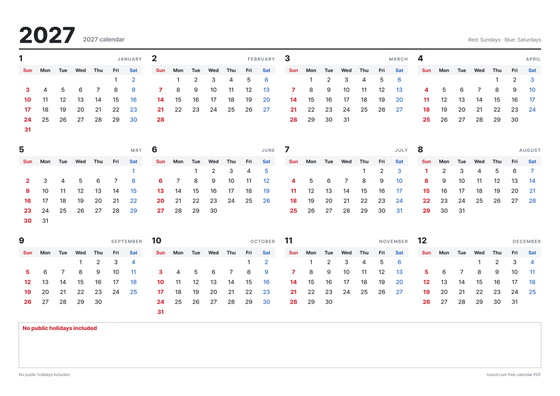 Annual calendar · A4 landscape Download PDF
-
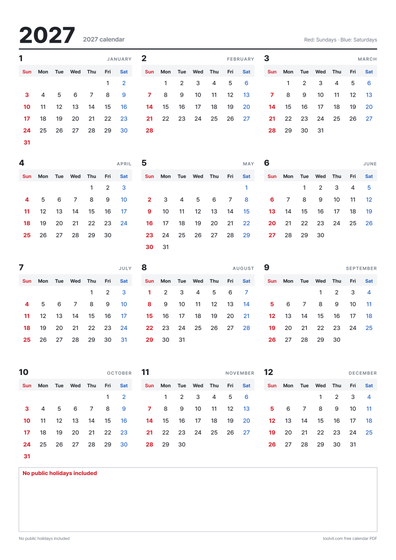 Annual calendar · A4 portrait Download PDF
-
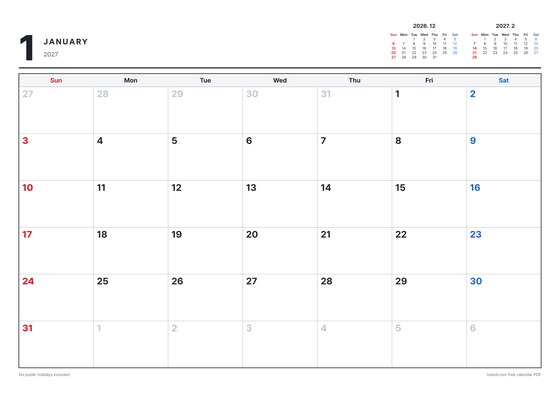 12 monthly pages · A4 landscape Download PDF
-
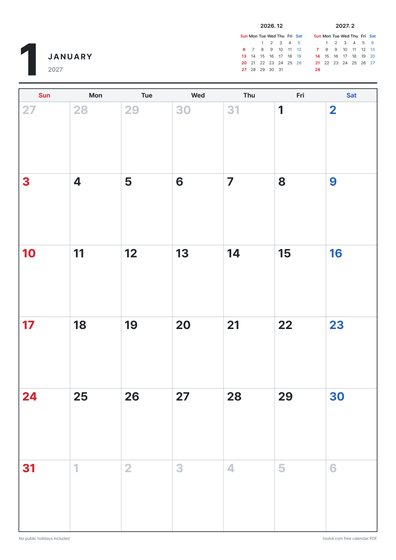 12 monthly pages · A4 portrait Download PDF
Print on A4 at actual size (100%), matching the file’s landscape or portrait orientation.
Add events and settings Birthdays, vacations, week start, grayscale, year
Preparing the preview. · Use the left and right arrow keys to turn pages.
Finished choosing? Download here.
PNG saves the current preview page; PDF saves every selected page.
Optional: South Korean date references
QUICK ANSWER
Optional: South Korean holidays in 2027
| Date | Korean public holiday | Note |
|---|---|---|
| 1/1 (Fri) | New Year’s Day | |
| 2/6 (Sat) | Seollal break | Korean lunar 12/30 |
| 2/7 (Sun) | Seollal | Korean lunar 1/1 |
| 2/8 (Mon) | Seollal break | Korean lunar 1/2 |
| 2/9 (Tue) | Substitute holiday | |
| 3/1 (Mon) | March 1 Movement | |
| 5/1 (Sat) | Labor Day | |
| 5/3 (Mon) | Substitute holiday | |
| 5/5 (Wed) | Children’s Day | |
| 5/13 (Thu) | Buddha’s Birthday | Korean lunar 4/8 |
| 6/6 (Sun) | Memorial Day | |
| 7/17 (Sat) | Constitution Day | |
| 7/19 (Mon) | Substitute holiday | |
| 8/15 (Sun) | Liberation Day | |
| 8/16 (Mon) | Substitute holiday | |
| 9/14 (Tue) | Chuseok break | Korean lunar 8/14 |
| 9/15 (Wed) | Chuseok | Korean lunar 8/15 |
| 9/16 (Thu) | Chuseok break | Korean lunar 8/16 |
| 10/3 (Sun) | National Foundation Day | |
| 10/4 (Mon) | Substitute holiday | |
| 10/9 (Sat) | Hangeul Day | |
| 10/11 (Mon) | Substitute holiday | |
| 12/25 (Sat) | Christmas | |
| 12/27 (Mon) | Substitute holiday |
South Korean reference only. The original 2026 table includes Labor Day and Constitution Day under the 2026 amendment. Regional, temporary and private-company days off may differ. These references do not turn on holidays in your calendar.
2026~2037 Korean Seollal, Chuseok and leap months
| Year | Seollal (lunar 1/1) | Chuseok (lunar 8/15) | Leap lunar month |
|---|---|---|---|
| 2026 | 2/17 (Tue) | 9/25 (Fri) | None |
| 2027 | 2/7 (Sun) | 9/15 (Wed) | None |
| 2028 * | 1/27 (Thu) | 10/3 (Tue) | Leap month 5 |
| 2029 * | 2/13 (Tue) | 9/22 (Sat) | None |
| 2030 * | 2/3 (Sun) | 9/12 (Thu) | None |
| 2031 * | 1/23 (Thu) | 10/1 (Wed) | Leap month 3 |
| 2032 * | 2/11 (Wed) | 9/19 (Sun) | None |
| 2033 * | 1/31 (Mon) | 9/8 (Thu) | Leap month 11 |
| 2034 * | 2/19 (Sun) | 9/27 (Wed) | None |
| 2035 * | 2/8 (Thu) | 9/16 (Sun) | None |
| 2036 * | 1/28 (Mon) | 10/4 (Sat) | Leap month 6 |
| 2037 * | 2/15 (Sun) | 9/24 (Thu) | None |
Korean lunar conversions use KASI data. An asterisk marks 2028 and later years, whose Korean public holidays remain projections under the original ruleset; elections and temporary holidays are excluded. The lunar-date table is a reference, not a local holiday calendar.
How to download and customize a printable calendar PDF
A printable calendar is useful when you want a clear monthly plan without opening an account or editing a spreadsheet. This tool creates a Gregorian calendar for years 2026~2037, with 2027 selected initially. Use one annual page for an overview or one page per month for room to write. The ready-made PDFs are A4, and the custom generator uses the same page dimensions and drawing engine. The English version starts the week on Sunday; you can switch to Monday. Public holidays, Korean lunar dates and solar terms are off by default so the blank calendar works for a personal schedule in any country.
The four download cards contain prebuilt 2027 PDFs: annual and monthly, each in landscape and portrait, at 300dpi. They do not need the preview to finish loading. Annual pages show all 12 months; monthly files contain 12 pages with adjacent mini calendars. English presets start on Sunday and Spanish presets on Monday. To add events, use grayscale, change the year or print only some months, open the settings and generate a custom file. Matching default settings produce the same date cells and page image as the preset.
The default calendar marks Sundays in red and Saturdays in blue without treating a weekday as a public holiday. In grayscale, bold type distinguishes Sundays. If you enable South Korean holidays, their names and date coloring come from the original Korean engine and the header identifies South Korea. The US and Spain have different national, state, regional and local holiday systems, which this optional switch does not calculate. Add the dates relevant to your own location as personal events instead.
When this calendar helps
- Print a 2027 monthly A4 calendar for a home office, kitchen wall or shared workspace.
- Keep Korean lunar birthdays or family anniversaries visible using optional lunar annotations or lunar-month pages.
- Plan across years from 2026~2037, using a one-page annual overview before printing selected months.
- Make a family calendar with birthdays, vacation ranges and school events written into the date cells.
- Prepare a Monday-start schedule for classes, a club or a volunteer group, without adding an unrelated holiday system.
- Print only the remaining months of 2026 instead of downloading a whole new annual file.
Before you start
- Check that your printer can use A4 and choose the correct landscape or portrait orientation. Letter paper may require scaling in the print dialog.
- For a monochrome printer, choose grayscale. Sundays and any enabled Korean holidays are distinguished by bold text.
- Events disappear when you refresh. Keep a separate copy of a long list and save the generated PDF before closing the page.
How to use it
- Choose 2026~2037 and Gregorian or Korean lunar pages. For Gregorian pages, choose monthly, annual or both. Select months individually or use “From this month”, which follows your device’s local date.
- Choose A4 landscape or portrait and Sunday or Monday as the first weekday. The English preset starts on Sunday and the Spanish preset on Monday.
- Adjust adjacent dates, mini calendars, notes and footers. Korean holidays, lunar annotations, solar terms, festivals and observances are optional and start off. In solar calendars, Key dates shows Korean lunar days one and fifteen and the lunar date on the first day of every Gregorian month.
- Enter one event per line: “2027-05-20 Anniversary”, “7/28~8/1 Vacation” or “lunar 3/15 Birthday”. English short dates use month/day; ISO dates avoid ambiguity.
- Check the preview and download the PDF for all selected pages. For one image, choose the page and use “This page as PNG”.
Holidays and country scope
No country’s public holidays are enabled in a plain calendar. The optional Korean switch uses South Korean government-office holiday rules, including substitute days, rather than rules for the country associated with the page language. The retained reference tables describe that Korean data. They are useful for a family or team coordinating with Korea, but do not establish a right to leave or an employer’s work schedule. For a local public holiday, consult the relevant public authority and add a personal event to the date you need.
Future years and optional Korean holiday projections
Gregorian weekday grids remain available through 2037. Optional Korean holidays from 2028 onward are projections under the retained 2026-09-26 ruleset until the relevant official almanac is incorporated. Election dates, temporary holidays and future rule changes can alter the result. The page marks projected Korean holidays when that option is enabled. Printing a blank calendar avoids assuming a particular country’s holiday rules; recheck the appropriate official calendar before relying on a future day off.
Korean lunar-month calendars
Korean lunar mode makes one page per lunar month, from the first day to the last. Large numbers are lunar days; the smaller corner annotation is the Gregorian date in the page language’s month/day or day/month order. A leap month gets its own page immediately after its regular month, so a full lunar year may contain 13 pages. Korean lunar years span parts of two Gregorian years. Enter “lunar 3/15 Birthday” in English or “lunar 15/3 Cumpleaños” in Spanish; use “lunar leap” or “lunar intercalar” for a leap month. This is specifically the Korean lunar calendar, whose dates can differ from other lunar calendars.
Lunar dates and solar terms
The optional lunar data comes from the Korea Astronomy and Space Science Institute conversion results for 2026-01-01~2038-02-28 retained by the original tool. Solar terms use the original astronomical calculation and Korean date convention. These features are useful when a Korean lunar birthday or seasonal observance matters; they start off in this version. Gregorian month grids and weekday calculations do not depend on enabling them. Missing or newly announced public holidays require a separate source update rather than a change of language or currency.
Check important dates against the relevant official source. The optional Korean data is not a list of US or Spanish holidays, and private employers may follow different schedules.
Dates, sources and limitations
- Scope
- A4 Gregorian calendars and optional Korean lunar pages for 2026~2037, saved as PDF or PNG. No public holidays are included by default. Korean holidays, terms and observances can be enabled explicitly; later holiday projections exclude elections, temporary and regional holidays.
- Method
- The Korean date data and ruleset remain dated 2026-09-26. Optional holidays use the retained KASA 2026/2027 almanacs and Korean government-office rules; later years are projections. Korean lunar starts come from KASI conversions and solar terms from the original astronomical calculation. Preview, PNG and PDF use the same date grids and drawing functions, with lossless images on fixed A4 pages. This language and display update is not a new holiday-law review.
- Limitations
- Optional Korean holidays follow government-office rules and may differ from private-company days off. Future projections can miss newly designated election or temporary holidays. Local US and Spanish holiday systems are not supplied here.
- Privacy
- Your calendar and files are created in this browser. Event text and settings are not sent to a server or saved between visits. Public font files load from jsDelivr; ready-made PDFs and previews load as ordinary site assets.
🗓️ Korean source review 2026-09-26 · 🔁 Next planned source review 2027-06-30
Reference sources
- KASA 2027 almanac, notice 2026-0078, published 2026-06-29; original Korean source reviewed 2026-09-26
- KASA 2026 almanac, published 2025-06-30, plus the 2026-04-30 Korean holiday amendment; original review 2026-09-26
- South Korean government-office holiday regulation, decree 36290, amendment 2026-04-30; original review 2026-09-26
- KASI Korean solar/lunar conversion, retained daily range 2026-01-01~2038-02-28; original review 2026-09-26
- Original solar-term calculation and independent 2028~2038 DE441 comparison; original review 2026-09-26
FAQ
Can I download a free 2027 calendar PDF without an account?
Yes. Choose one of the four ready-made A4 PDFs: one annual page or 12 monthly pages, landscape or portrait. English files start on Sunday, Spanish files on Monday, and neither includes public holidays. Open the settings to customize your own file.
Can I choose another year, week start or holiday system?
Choose any year from 2026~2037 and Sunday or Monday as the first weekday. The default calendar has no public holidays. An optional switch adds South Korean holidays under the original Korean ruleset, not US or Spanish holidays. Add local dates yourself as events.
How do I enter events and vacation ranges?
Use one line per event, for example “2027-05-20 Anniversary” or “7/28~8/1 Vacation”. English short dates use month/day; Spanish uses day/month. ISO dates work in both. Labels allow 24 characters and up to 120 event lines; date ranges allow up to 62 days.
What does the optional Korean lunar mode mean?
It uses the original Korean lunar data, not a universal lunar calendar. Each lunar month has its own page, with a separate page for a leap month. For birthdays, enter “lunar 3/15 Birthday” in English or “lunar 15/3 Cumpleaños” in Spanish. The lunar dates and solar terms are off by default.
How do I print the PDF, save a PNG and keep my events?
Print on A4 at actual size (100%) in the file’s orientation. A3 can use fit-to-paper scaling; Letter may resize or crop unless you choose an appropriate print setting. PDF includes all selected pages; PNG saves only the current page. Events are processed locally and are not saved, so keep your own copy before refreshing or closing.